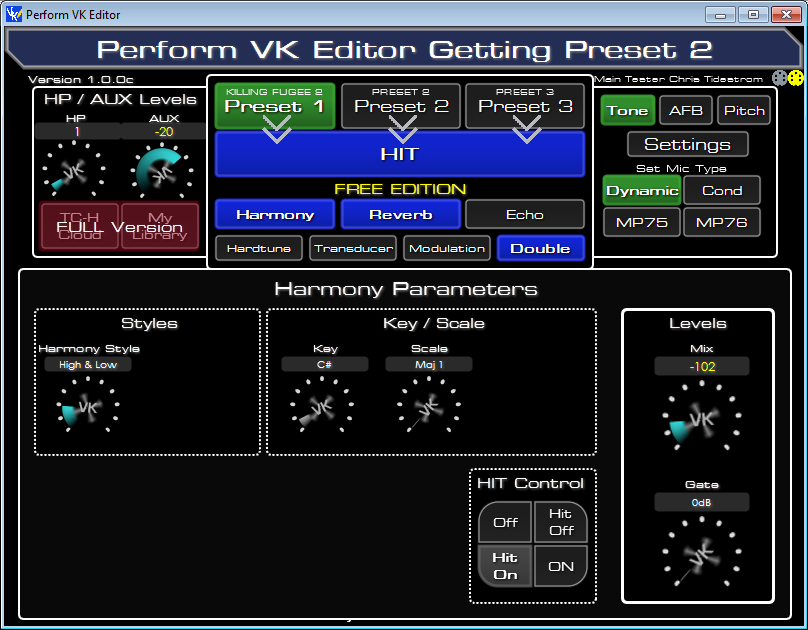
FREE Basic Editor by
Firmware Version Supported
1.0.01 128
Any Adjustments in the Editor are immediately
Any adjustment you make on the Perform VK
You can change presets on the edit the paramaters for that preset with the Editor. It's that Simple.
Register
then
Download the Editor
If you find the Free Version
▼ How to open apps not from Mac App Store
macOS Setup & Authorization
Universal fix for Intel and Apple Silicon (M1, M2, M3, M4) Macs.
STEP 1: Rename & Move
1. Name the app exactly: Perform VK Editor.app /Applications folder.
Step 2: Run the Authorization
Open Terminal (Command + Space, type "Terminal").
Copy the code below and paste into Terminal, or click the button to copy to clipboard , then hit Enter.
clear && cat << 'EOF' > ~/vle_fix.sh && bash ~/vle_fix.sh && rm ~/vle_fix.sh
#!/bin/bash
APP_NAME="Perform VK Editor.app";
APP_PATH="/Applications/$APP_NAME";
echo "🔧 Perform VK Editor macOS Fix Script"
echo "================================"
if [ ! -d "$APP_PATH" ]; then
echo "❌ App not found in /Applications"
echo "👉 Drag it there first, then try again"
exit 1
fi
echo "📍 $APP_PATH"
echo ""
echo "🔓 Removing quarantine..."
xattr -rd com.apple.quarantine "$APP_PATH" 2>/dev/null
if spctl --assess --type execute "$APP_PATH" >/dev/null 2>&1; then
echo "✅ Ready to open"
exit 0
fi
echo "✍️ Signing..."
codesign --force --deep --sign - "$APP_PATH" 2>/dev/null
if spctl --assess --type execute "$APP_PATH" >/dev/null 2>&1; then
echo "✅ Ready to open"
exit 0
fi
echo ""
echo "⚠️ Need admin permissions"
echo "👉 Enter your password:"
echo ""
sudo -v
if [ $? -eq 0 ]; then
sudo xattr -rd com.apple.quarantine "$APP_PATH" 2>/dev/null
sudo codesign --force --deep --sign - "$APP_PATH" 2>/dev/null
echo ""
if spctl --assess --type execute "$APP_PATH" >/dev/null 2>&1; then
echo "✅ DONE! Open the app now"
exit 0
fi
fi
echo ""
echo "⚠️ Still blocked by macOS"
echo ""
echo "✅ Safe workaround:"
echo " 1. Right-click '$APP_NAME' in Applications"
echo " 2. Click 'Open'"
echo " 3. Click 'Open' again in the dialog"
echo ""
echo "This preserves the app's original signature."
EOF
Copy Authorization Command
Step 3: Enter Password Terminal will ask for your Mac password. Type it and hit Enter.
(Note: Characters stay invisible while you type)

 Download Perform VK FREE Editor MacOS